Real-Time Image Recognition for Waste Sorting Using Deep Learning
Hold one waste item in front of the camera (or upload a photo of it). The model says what type of waste it is, how sure it is, and which bin it should go in.
Start the camera or upload a photo
Loading the model...
Detected waste type
-
The bin will appear here
Which bin?
| Waste type | Examples | Bin |
|---|---|---|
| Plastic | bottles, food boxes, bags | Yellow |
| Metal | cans, tins, foil | Yellow |
| Paper | paper, newspapers, cardboard | Blue |
| Glass | glass bottles and jars | Green |
| Organic | food leftovers, fruit, vegetables | Brown |
| Other | clothes, shoes, batteries, mixed trash | Grey (general waste) |
Bin colours are different from city to city. These are the most common ones.
How it works
- Camera - the browser takes a frame from the camera a few times per second.
- Preprocessing - the frame is cropped to a square, resized to 224 x 224 pixels and normalised.
- Deep learning model - a MobileNetV3 CNN, retrained on photos of waste (transfer learning), gives a probability for each waste type.
- Decision - the type with the highest probability is shown with its confidence and the matching bin. If the model is less than 50% sure, it asks you to move the item closer.
Model details
| Part | Details |
|---|---|
| Network | MobileNetV3 (pretrained on ImageNet, last layers retrained) |
| Input | 224 x 224 colour image |
| Classes | plastic, paper, glass, metal, organic, other |
| Dataset | - |
| Test accuracy | - |
| Runs on | ONNX Runtime Web, inside the browser |
Results
The photos were split into 80% for training, 10% for checking during training and 10% for the final test. The test photos were never seen by the model during training.
| Waste type | Correct on test photos |
|---|
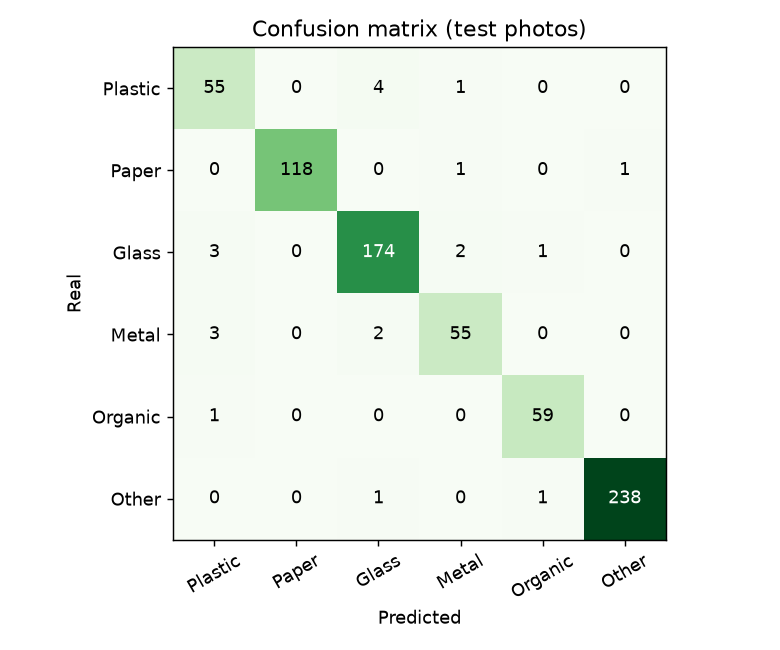
The confusion matrix shows the real type (rows) against what the model predicted (columns). The diagonal is the photos it got right.